Playtime 2
2024-10-16
Playtime 2
Use the repository below for the questions. Each page of questions starts with this repository, so one page of questions does not influence the next.
However questions on one page do affect each other, if question 1 changes the repository, question 2 assumes the changed repository.
I will not ask you to draw images or how the repository looks after the questions, but it may be helpful to try to imagine this in your own mind (or draw on paper).
Repository
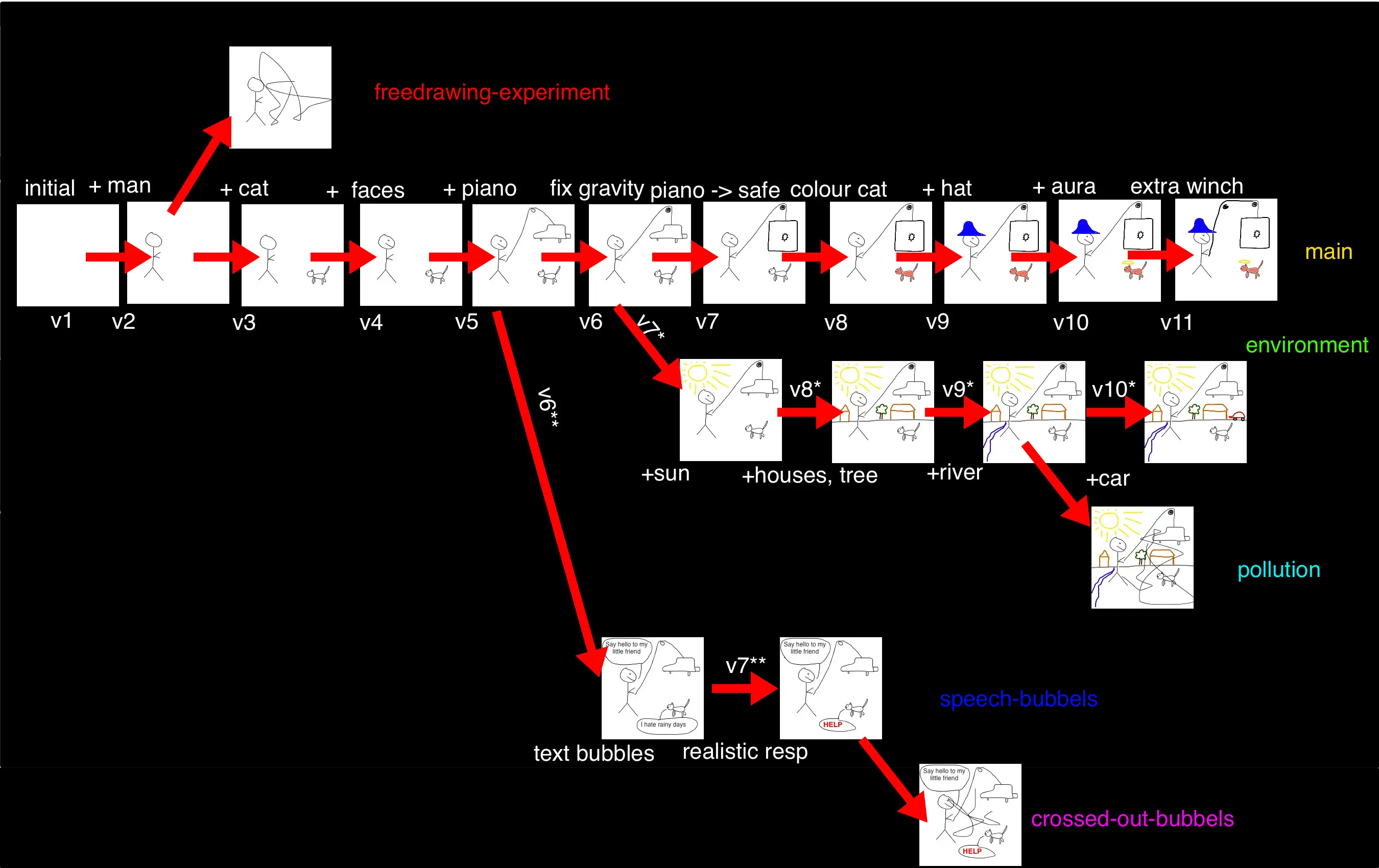
branches-with-names
Exercise 1
How many commits are on the main branch?
I’m on main, and I type git revert v9. What happens? How many commits are now on the main branch?
I type git revert v7. What happens? How many commits are now on the main branch?
- 11
- an extra commit is added to the
mainbranch, that is the opposite ofv9(-hat). The final image on themainbranch is now like the previous last image, but without a hat on. There are now 12 commits. - an extra commit is added replacing the safe with a piano. So the result is without a hat and with a piano instead of a safe. There are now 13 commits on the
mainbranch.
1.1
We are on the environment branch.
What is the effect of git revert v4?
What is the effect of git revert v8?
- An extra commit is added to the
environmentbranch, removing the faces - This is interesting, since
v8is not in the ancestry ofenvironment(note, although we havev8*on the environment branch, remember that these names were only chosen for convenience sake; ingitworld these will be called64f9dand1ef70or something, so they have absolutely no relation togit).gititself does not care thatv8is not on theenvironmentbranch, and will still try to add a commit that is the opposite ofv8, so “remove colour from the cat”. This however will lead to a conflict, since the cat is not coloured.
1.2
We are on the pollution branch
What is the effect of git merge environment ?
What is the effect of git merge speech-bubbles ?
- The
pollutionbranch will grow one commit, namely thev10*one, adding the car. Note that there are different merge-strategies, and not all add the merged in branch into the current branch, but for these questions we assume that they do. - The
pollutionbranch grows another two commits, and now has a car, and speech bubbles “Say hello to my little friend” and “HELP”.
1.3
We are on the speech-bubbles branch. What is the effect of git merge main
What would be the difference if instead, we would have been on the main branch and do git merge speech-bubbles?
- Remember that
mainis just a branch as any other. The result is that thespeech-bubblesbranch grows with all the commits that were done since the last common commit, sov6,v7,v8,v9,v10,v11 - There are two differences: (1) only the branch you are on is affected, so in the former case the
mainbranch would stay the same and thespeech-bubblesbranch grows, in the latter case the other way around. Secondly, using this merge strategy the difference is that in the former case the changes are ordered to first havev6**andv7**and only thenv6...v11, in the latter case it’s the other way around. The resulting image would be the same in both cases.
1.4
We are on the main branch.
What is the effect of git cherry-pick v6**?
What is the effect of git cherry-pick v9*?
What is the effect of git cherry-pick v7**?
- There will be one more commit on
mainthat adds text bubbles “Say hello to my little friend” and “I hate rainy days”. - One more commit, adding a river.
- If this was done on a clean repository, it would give a conflict, however since
v6**was already merged, it will work and replace the second bubble with HELP. So on main there will now be 3 new commits (as compared to the original repo), one adding 2 bubbles, one adding a river, and one replacing the second bubble.
1.5
We are on the main branch.
I want to change the picture in the following ways: replace the safe by a piano, and add a car and a sun. What commands do I use?
git revert v7; git cherry-pick 'v10*'; git cherry-pick 'v7*'. Some remarks: (1) the semicolon;means “next command” in shell. Also correct isgit revert v7 && git cherry-pick 'v10*' && git cherry-pick 'v7*'.&&means “only run the next command if the previous command was successful”. (2) we need quotes aroundv7*andv10*because*has a special meaning in shell. It just shows that my naming conventions for the commits was not that good, and thegitway of naming things is much better.
1.6
We are on the main branch.
I want to add text bubbles “Say hello to my little friend” and “I hate rainy days” but in this exercise you are not allowed to use git cherry-pick.
git merge speech-bubbles && git revert 'v7**'
Exercise 2: Some shell practice
- Make a new directory
playtime-2(or what you want), and in that directory make two subdirectoriesAandB. - Make another subdirectory
C.txt(never in real life give your directories the extension.txtunless you want other people (including your future self) to hate you. However nothing technical is stopping you from putting whatever extension you want in a directory name.
2.1
- The command
seq #end#prints all numbers from 1 to end. Create a file100.txtin theAsubdirectory, containing all numbers from 1 to 100. - Copy the file
100.txtto theC.txtsubdirectory. - Now in the last command, replace
C.txtbyD.txt. What happens? - Print the
D.txtfile to the terminal. You will see that you cannot see the whole file at once without scrolling. - The command
lesstakes the input, and only shows as much as fits on the screen. You can pipe any output into this command by adding| less(|is the pipe symbol). Try this and see how it works. Usingspaceyou can scroll down. Usingqyou can quit thelessprogram. - Finally, remove the
100.txtfile in theAsubdirectory.