Playtime 4
2024-10-30
Playtime
- Each page has one assignment.
- There are (hidden) hints and solutions on the page, that you can unhide with the button
- The solutions work as follows:
- lines starting with
$are commands to type - Anything after
#is a comment (so no need to type it in) - lines starting with something else are expected results
- things like usernames may be different in your results
- lines starting with
- The solutions may contain more
lsandpwdandgit statusandmd5sumcommands than necessary, however this so that the student can check they have the same thing - Sometimes there is a vertical slide with extra deep-dive info
Congratulations, you found the vertical slide. Some exercises will have these vertical slides, and you can find more info, or deep-dive info in there.
There may be solutions or hints to the exercise in the vertical scroll, so only go there after you have solved the exercise.
Extra assignment (multiple down-pages, read all)
At some point (but maybe better after you do at least some of the exercises):
- Create a git repository for one of your code bases on your own computer. Remember that a repository is typically one project, code that belongs together. For me, this class is one repository. Behave (the app + website) is another. I actually have a separate repository for the behave paper.
- Make a first commit with the current state of your code (don’t worry about the exact commit message; first commit can just be called “initial state” or something like that). Make sure you choose what to check in; data and results from your code runs (e.g. graphs that you created) should not be checked in. Files larger than 1MB should (probably) not be checked in. Plugins/packages that you downloaded from somewhere else should (probably) not be checked in.
- If you work on this code, try to commit a new version whenever you tell yourself “I did that very well, it’s working now”. Try to come up with semantic commit messages – if you find yourself writing messages like “I did this and I did this and I did this”, you should probably commit more often :).
Exercise 1
Create a new directory in your home directory named minions and move to this new directory
Exercise 2
Start a new git respository in this directory
$ pwd
/home/claude/minions
$ ls -la # see vertical slide for more info on the `-la` part
total 12
drwxr-xr-x 2 claude claude 4096 Mar 24 10:56 .
drwxr-x--- 1 claude claude 4096 Mar 24 10:56 ..
$ git init # starts new, empty, respository in current directory
Initialized empty Git repository in /home/claude/minions/.git/
$ git status
On branch main

No commits yet

nothing to commit (create/copy files and use "git add" to track)
$ ls -la
total 16
drwxr-xr-x 3 claude claude 4096 Mar 24 11:01 .
drwxr-x--- 1 claude claude 4096 Mar 24 11:01 ..
drwxr-xr-x 7 claude claude 4096 Mar 24 11:04 .git
ls -lais a short form forls -l -a(in lesson 2 we saw that often two short flags (-land-a) can be pulled together into-la).-ameans that we want to see all files, including hidden files (the ones starting with.– see one more vertical slide for more info).-l(lower-case L) means long format. It lists one file per line, and adds some info:The exact format differs per system, but usually contains similar information
total 12
drwxr-xr-x 2 claude claude 4096 Mar 24 10:56 .
drwxr-x--- 1 claude claude 4096 Mar 24 10:56 ..- As you may remember,
.is the current dir and..the parent dir. These are always present (so this, in effect, is an empty directory). - The first line says that 12 blocks (of disk space) are used for the directory information (not to store the files in the directory, just the list of links to the files).
- each file/directory is one line
- the start
drwxr-xr-xexplains that it is a directory (d), and next who has rights to read/write/access it (you can ignore this for now) claude claudedescribes the owner (and group) of the file4096is the disk size of this file or directoryMar 24 10:56is the modified time (last time something changed). It depends on the system which timezone this is in (in our case: UTC)- The
1and2are number of links, please ignore :)
hidden files
- In Windows, each file has a small flag (piece of metadata) that descibes if a file is hidden or not. You can have a file
bananas.txtand make it a hidden file (and it won’t show in your explorer, unless you switch it to show hidden files). - In *nix systems (incl Linux and MacOS) this works differently. A hidden file is any file with a name starting with with a
.(dot). - This includes
.and.., the current and parent directory (which is why you normally don’t see them if you dolswithout-a). - This also explains why if you use a USB stick from Mac on Windows, you will see files like
.DS_Store, which you don’t see on mac. These are hidden files on mac, but not on windows. - The directory
.gitis therefore also a hidden directory. Even though it’s a good idea to ignore.gitdirectory, there are many hidden files that are useful to be aware of.
Exercise 3
Remove repository in minions directory
Literally the only thing that makes the directory a git repository, is the presence of the .git directory
$ pwd
/home/claude/minions
$ ls -la
total 16
drwxr-xr-x 3 claude claude 4096 Mar 24 11:01 .
drwxr-x--- 1 claude claude 4096 Mar 24 11:01 ..
drwxr-xr-x 7 claude claude 4096 Mar 24 11:04 .git
$ rm -r .git # -r means "recursive", it will delete a whole directory
$ ls -la
total 12
drwxr-xr-x 2 claude claude 4096 Mar 24 11:06 .
drwxr-x--- 1 claude claude 4096 Mar 24 11:01 ..
# as you can see, no more .git directory
$ git status
fatal: not a git repository (or any of the parent directories): .git
# also git knows it's not a git repository anymore
#(it looks in the current director, and ALL parents (until it gets to /)
Deleting the repo means you lose all info (commits, log messages, history) in the repo (unless it’s backed up, e.g. in GitHub)
In “normal life” there is little reason to ever delete the repo; this exercise is mostly to show that the repository is no magic, just a directory and nothing more.
Exercise 4
Recreate git repository and check the log (note, checking the log may fail at this time)
$ pwd
/home/claude/minions
$ ls -la
total 12
drwxr-xr-x 2 claude claude 4096 Mar 24 11:06 .
drwxr-x--- 1 claude claude 4096 Mar 24 11:01 ..
$ git init
Initialized empty Git repository in /home/claude/minions/.git/
$ git init
Reinitialized existing Git repository in /home/claude/minions/.git/
# So if you type git init in an already existing repo, it does nothing much
$ git log
fatal: your current branch 'main' does not have any commits yet
# makes sense, the branch is empty, there is nothing to show
Exercise 5
Create a simple file bananas.txt, write some text (minimal 5 lines) and save the file
$ pwd
/home/claude/minions
$ ls -la
total 16
drwxr-xr-x 3 claude claude 4096 Mar 24 11:17 .
drwxr-x--- 1 claude claude 4096 Mar 24 11:01 ..
drwxr-xr-x 7 claude claude 4096 Mar 24 11:17 .git
$ nano bananas.txt  # save with CTRL-O and exit with CTRL-X when done
# see slide "below" to see alternative way to create the file
$ ls -la
total 20
drwxr-xr-x 3 claude claude 4096 Mar 24 11:24 .
drwxr-x--- 1 claude claude 4096 Mar 24 11:22 ..
drwxr-xr-x 7 claude claude 4096 Mar 24 11:17 .git
-rw-r--r-- 1 claude claude  145 Mar 24 11:23 bananas.txt
# alternative way to create the file
$ echo "Ba Ba Ba, Ba Ba Na Na
Ba Ba Ba, Ba Ba Na Na
Bananahahaaa
Potatoo nahahaaa
Tokadido Pokatoli
Kalimanomani
Tanotika
Ba Ba Ba, Ba Ba Na Na" > bananas.txtBecause we used a quote (“), we can use multiple lines in our echo statement (the statement won’t end until the quote is closed). Watch out in this method, that if the thing you paste contains quotes by itself, it will be interpreted as endquote and it won’t always work.
E.g (don’t run this, it will give errors)
Exercise 6
Run git status. What does it tell you?
$ pwd
/home/claude/minions
$ ls -la
total 20
drwxr-xr-x 3 claude claude 4096 Mar 24 11:24 .
drwxr-x--- 1 claude claude 4096 Mar 24 11:22 ..
drwxr-xr-x 7 claude claude 4096 Mar 24 11:17 .git
-rw-r--r-- 1 claude claude  145 Mar 24 11:23 bananas.txt
$ git status
On branch main

No commits yet

Untracked files:
  (use "git add <file>..." to include in what will be committed)
        bananas.txt

nothing added to commit but untracked files present (use "git add" to track)
# It says that there is one untracked files. Untracked means "it is present in your working directory, but not in (the currently checked out) git revision.
# Think of "track changed" in Word; untracked means that changes are not being tracked (and remember, everything, including creation of a file, is a change).
Exercise 7
Move the file (or technically the changes) into the index
The add subcommand takes a filename as parameter
$ pwd
/home/claude/minions
$ ls -la
total 20
drwxr-xr-x 3 claude claude 4096 Mar 24 11:24 .
drwxr-x--- 1 claude claude 4096 Mar 24 11:22 ..
drwxr-xr-x 7 claude claude 4096 Mar 24 11:17 .git
-rw-r--r-- 1 claude claude  145 Mar 24 11:23 bananas.txt
$ git add bananas.txt
# That's it :)) -- next exercise we confirm whether it worked
# alternatively you can do `git add *` to add all (non-hidden) files
# or `git add .` to add (everything in) the current directory.
Exercise 8
Run git status again. What does it tell you now?
$ pwd
/home/claude/minions
$ ls -la
total 20
drwxr-xr-x 3 claude claude 4096 Mar 24 11:24 .
drwxr-x--- 1 claude claude 4096 Mar 24 11:22 ..
drwxr-xr-x 7 claude claude 4096 Mar 24 11:17 .git
-rw-r--r-- 1 claude claude  145 Mar 24 11:23 bananas.txt
$ git status
On branch main

No commits yet

Changes to be committed:
  (use "git rm --cached <file>..." to unstage)
        new file:   bananas.txt

# It shows that the bananas.txt file is not longer untracked, but now ready to be committed
Exercise 9
Commit index into repo. Create a commit message
# NB: THIS ANSWER BOX CAN BE SCROLLED DOWN FOR THE WHOLE ANSWER
$ pwd
/home/claude/minions
$ git status -s
A  bananas.txt
# -s means "--short". See vertical slide for explanation of the format
# Feel free to use -s or not use it in the future.
$ git commit
Author identity unknown

*** Please tell me who you are.

Run

  git config --global user.email "you@example.com"
  git config --global user.name "Your Name"

to set your accounts default identity.
Omit --global to set the identity only in this repository.

fatal: unable to auto-detect email address (got 'claude@8a554909b6fd.(none)')

# Oops, git needs to know what name and email to put on our commits.
# Remember that (for now) we're using git 100% locally, so it really
# doesn't matter what you use here, but let's be honest.
# See below for more info
$ git config --global user.email "claude@claude.nl"
$ git config --global user.name "Claude"
# Let's try again
$ git commit
# This opened a nano editor. Type a commit message (e.g. "Bananas for minions") and
# press CTRL-O <enter> to save and CTRL-X to exit
# You can ignore the stuff beneath, as described it will all be ignored since it starts with `#`
[main (root-commit) 4075390] Bananas for minions
 1 file changed, 9 insertions(+)
 create mode 100644 bananas.txt
# Looked like that worked, a new commit with sha `4075390`
$ git status
On branch main
nothing to commit, working tree clean
# makes sense, after we committed, there are no further changes
$ ls -la
total 20
drwxr-xr-x 3 claude claude 4096 Mar 24 11:24 .
drwxr-x--- 1 claude claude 4096 Mar 24 17:50 ..
drwxr-xr-x 8 claude claude 4096 Mar 24 18:16 .git
-rw-r--r-- 1 claude claude  145 Mar 24 11:47 bananas.txt
# but the file is (obviously) still there
git status --short format.
- Each file (except those that are the same in local directory, index, and current revision) get a single line.
- The first character describes the differences between current revision and index
- The second character describes the differences between index and working directory
- Generally in
git statusgreen colours are about index stuff, red about local directory stuff - A space means “no changes”
Ameans the file is [A]dded (new)Mmeans the file is [M]odifiedDmeans the file is [D]eleted??means an untracked file.
Example (note that colours are wrong)
means:
bananas.txtwas “Added to index, no local changes” (Aas first character, space as second)orange.txtwas “Modified in local directory, but changes were not staged” (staged means: present in index)
git config
First time you use git on a new computer, git wants to know who you are (name and email). Git will never do anything with this data, except add it to every commit you make. If someone checks the log of commits later on, they can see this information (and will be able to talk to you, or email you in case they don’t know you).
What you fill in here is 100% your choice. It does mean that I can fill in
Joe Bidenandpresident@whitehouse.orgif I want. Or I can fill in “Martyna Syposz” as name and make some commits to a project we both work on, and she’ll get blames for all mistakes I make.Takeaway: this is for convenience only, never take a name or email address on a git commit as proof that it was that person!
A good commit message
- As discussed in the lesson, a good commit message says “what the change means”, not “what the change is”.
- So
Make code not crash with large input filesis a good commit message.Changed "MAX_SIZE=500" into "MAX_SIZE=1000" in line 34is a bad message. - Long(er) commit messages are completely ok (although more than 5 lines is maybe too much); convention is then (although you can change the convention if you want):
- First line is short (max 50 characters), a summary
- Second line is empty
- Beyond that, write as much as you want)
- For trivial commits (e.g. fixing typos), I’m quite happy with just a trivial (e.g.
typo) commit message
Good (but maybe bit elaborate) commit message:
Bugfix: code crashed if input was empty

It turned out that if you provided an empty list to the `process()` function, the code would crash.
This is because `process()` would display a percentage completion, which was `nr_processed / input.length`, so en empty list resulted in division by zero error.
Added an if statement that makes progress = 100% if input.length == 0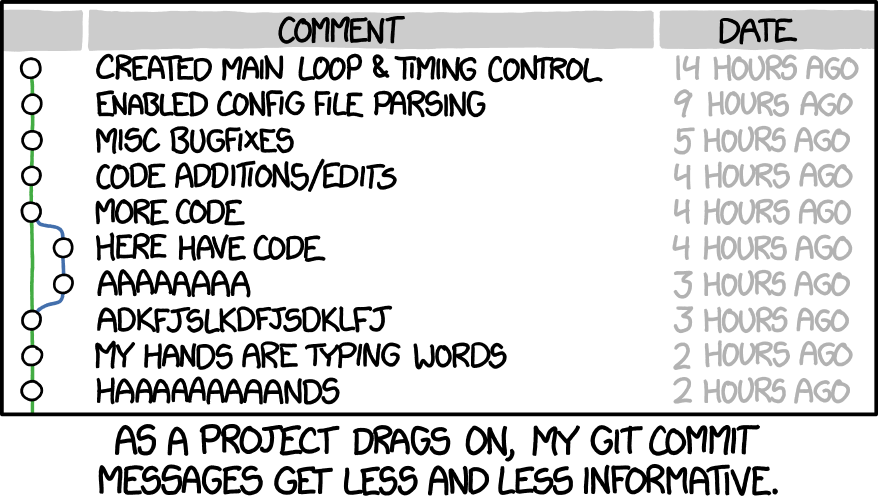
XKCD commit messages commic
The sad truth, especially late at night - Source: XKCD
Last one (I promise!)
git commitwithout a commit message on the command line, will open the nano editor- You have to save the text message to some pre-aranged location (the default save place), and
git commitwill pick the message up from there (this is what we did in the “solution”) - Opening the nano text editor may be useful to write a long commit message, but overkill for a short one
- You can give a commit message with the
-mflag. If your commit message has spaces, you will need quotes (") around it - In that case, watch out for quotes in your commit message itself (also don’t use
!, because this has special meaning inbash)
git commit -m "typo"  # since there are no spaces in the message, the quotes around `typo` are not needed, but they don't hurt either
git commit -m "Bananas for minions"
git commit -m "I can write a very long commit message and this will not be a problem (except that convention said it should be short)"
git commit -m "ONE MORE TYPO!!!!" # WRONG: you cannot use ! on the terminal (in addition that, the message is not very informative, just `typo` would be better)
git commit -m "A fix for the "cannot open editor" bug"  # WRONG: the whole message must be between quotes, but the " before `cannot` closes the start quote
Exercise 10
Create fluffy.txt, add it to index and commit
(nb: it’s hard to find good semantic commit messages when you’re just doing exercises. I think just using “exercise page 26” or something is fine)
$ pwd
/home/claude/minions
$ git status -s
# no reply means latest revision, index and working directory are all the same
$ echo "It's so fluffy" > fluffy.txt
$ git add fluffy.txt
$ git status -s
A  fluffy.txt
$ git commit -m "exercise 26"
[main a587278] fluffy
 1 file changed, 1 insertion(+)
 create mode 100644 fluffy.txt
Congratulations
🎉
You made it to the end
Please keep the homework, we will continue working with this repository next week.
The things in this lesson are essential, and exercise is required. Try to commit something at least once a day in your normal code.