gitGraph commit id:"123abc" commit id:"456def" branch remotes/origin/main commit id:"789bcd" checkout main commit id:"234efa"
Playtime 6
Claude
2024-11-20
Playtime 6
In today’s playtime we are going to work together on a quarto website for recipes. The goal of the lesson is for you guys to get a bit of a feel of how it is to work together on a repository. Learning quarto is of course a nice side effect but is explicitly not a goal. Also, making a good recipe is not a goal.
It all means that for me it’s OK if you guys just ask ChatGPT:
Hey, make me a Markdown page describing how to make an authentic New York Pizza” and use that.
Then again, leaking Markdown and quarto is useful and making actual recipes is also appreciated.
(next page below)
Ideally you would work on this task for 10 minutes each day for a couple of days in a row and check in your code every time. This way you all should get an experience of what it’s really like to work on a repository where other people are working at the same time. If you don’t know what do do because you’re done after the first day, just make small updates to your page, or create a second one!
I understand completely if you argue back that in this case you should be working in a branch and maybe only merge all your work to main when it’s all finished. I fully agree, but this is not what we are doing this time: for this exercise everything should be on the main branch and pushed to GitHub as soon as possible. We do this in order to actually get some commits on the main repository (which means you can train with lots of commits happening on a repository).
Please do all git things on the commandline and not in RStudio (at least in the beginning; if at the 3rd day you want to play with RStudio git integration, I can only applaud that!)
Step 1
- If not done yet, please accept the GitHub invites you have in your mail to joing the nitwit2gitwit organisation, and the course-2024 team. This will give you read and write access to the repository we work with.
- The repository is at https://github.com/nitwit2gitwit/recipes-2024. I added some code so that after each push to GitHub, the website is built and published at https://n2g-recipes-2024.claude-apps.com (this might take a couple of minutes). Even though the repository is private, this website can be seen by everyone. Please visit the website and see what is there.
- Now clone the repository (
mainbranch so no need to switch branches) and start a RStudio project in the directory you cloned it in. Render the website in RStudio and see that it’s the same.
(scroll down to see a step-by-step solution, in case you get stuck)
# First go to the directory in which you want to make the clone
# NB: making a clone (by default) always makes a new subdirectory which is the
# last part of the repository url
$ cd nitwit2gitwit
$ git clone https://github.com/nitwit2gitwit/recipes-2024
Cloning into 'recipes-2024'...
remote: Enumerating objects: 56, done.
remote: Counting objects: 100% (56/56), done.
remote: Compressing objects: 100% (42/42), done.
remote: Total 56 (delta 17), reused 48 (delta 9), pack-reused 0 (from 0)
Receiving objects: 100% (56/56), 768.09 KiB | 1.79 MiB/s, done.
Resolving deltas: 100% (17/17), done.
# Don't forget to actually go into the directory you just made (was made by git clone)
$ cd recipes-2024

# Extra (but the commands below don't do anything but give you info)
$ git remote -v
origin  https://github.com/nitwit2gitwit/recipes-2024 (fetch)
origin  https://github.com/nitwit2gitwit/recipes-2024 (push)
# Makes sense, there is one remote (that is used for both fetch(pull) and push), which was set automatically
# when we cloned. In advanced situations one may want to have different remotes for fetch and push
# but I have never encountered these situations yet.
$ git branch --all
* main
  remotes/origin/HEAD -> origin/main
  remotes/origin/main
# Also makes sense, there are three branches (one local main, one remote main, and one remotes/origin/HEAD, which is always there for every remote)
# I understand that some of you might have been a bit confused that during the lesson we had to do now "git checkout quarto".
# This was only because the quarto version of the slides was in the "quarto" branch, there was nothing magic.
# I could have named the branch "rabbitears" or "weirdpresentationformat" or whatever.
The next step is to create a new RStudio project. First make sure you know in which directory you cloned the repository (do pwd in the terminal if you are unsure).
- In RStudio go to File->New Project…”
- Now click “Existing Directory”, since we already have an existing directory with code.
- Browse to the recipes-2024 directory (the one created by
git clone) and click “Create Project”. - Now, in order to render the website, open
index.qmdin RStudio, and click “Render”. - After a while you should see the exact same site as on https://n2g-recipes-2024.claude-apps.com.
- Check that at the top there is a “Recipes” link, that brings you to a page with a list of all recipes. There should at least be a Cheese Fondue and a Carrot Cake there (and possibly more by the time you do this).
(Next page: screenshot how Rstudio file tree should look after you create the project)
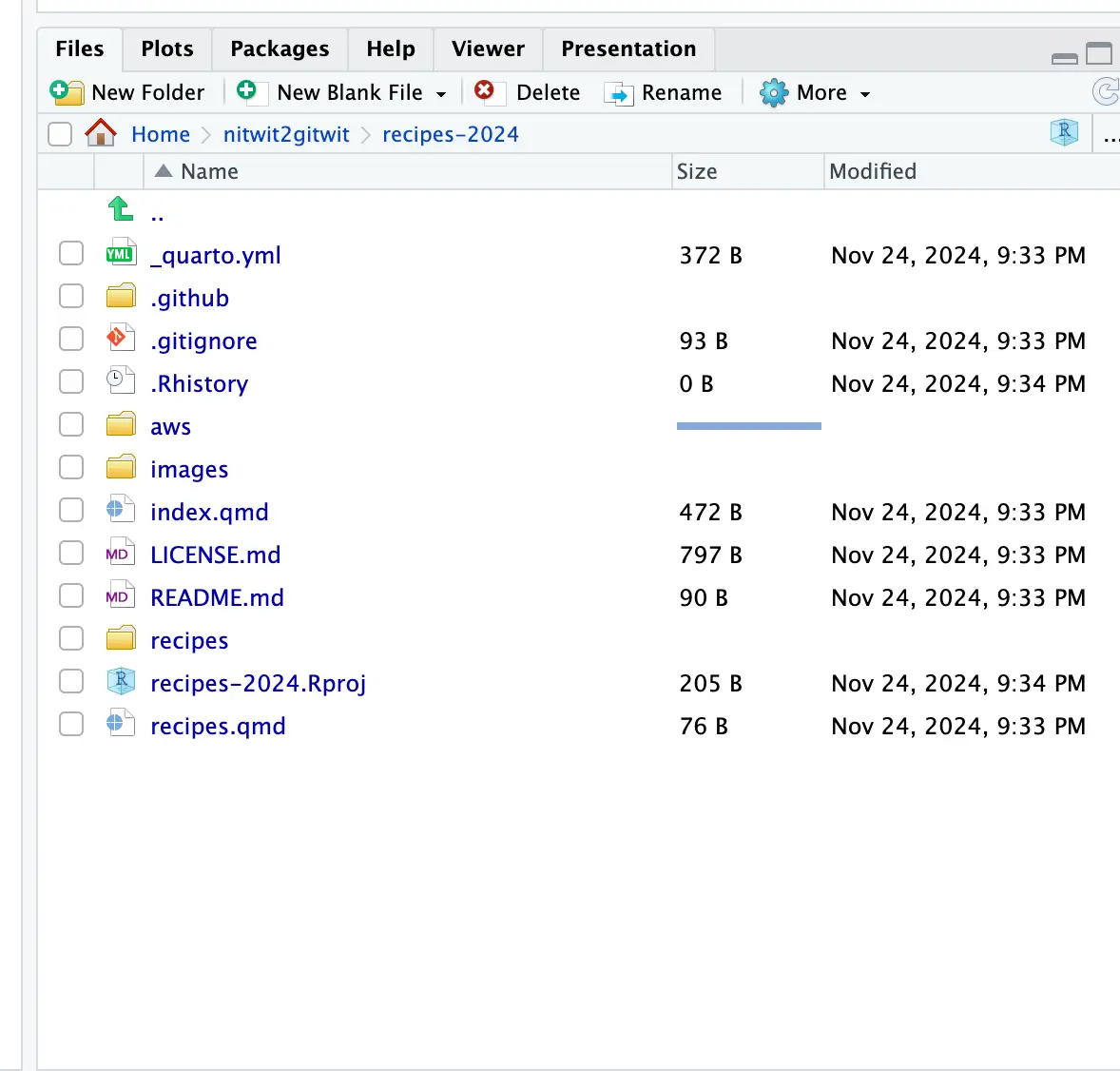
How Rstudio file tree should look after you create the project (exact details may differ but should be these files)
Step 2
Add a file in the /recipes/ directory with the .qmd extension (e.g. donuts.qmd). The first couple of lines should be:
Underneath you can start writing your recipe. Maybe only start with the first 10 lines, finishing and making it pretty can be later. Feel free to use cheese-fondue.qmd as an example.
Step 3
- Save and render your file and see how it looks.
- The quarto project is set up so that any file in the
/recipes/directory automatically appears in therecipetab at the top. Check if that works for you. - If everything is OK, commit your files and push
- Remember, if push fails, it may be because someone else pushed since the last time you pulled. In that case you might need to pull. If pull fails (or you want to learn something), see below.
Pulling may result in the following message (or similar):
hint: You have divergent branches and need to specify how to reconcile them.
hint: You can do so by running one of the following commands sometime before
hint: your next pull:
hint:
hint:   git config pull.rebase false  # merge
hint:   git config pull.rebase true   # rebase
hint:   git config pull.ff only       # fast-forward only
hint:
hint: You can replace "git config" with "git config --global" to set a default
hint: preference for all repositories. You can also pass --rebase, --no-rebase,
hint: or --ff-only on the command line to override the configured default per
hint: invocation.
With the knowledge from last lesson, you should be able to understand what it says.
It wants to know what it should do if you pull, but main and remotes/origin/main diverged:
It says there are three ways this situation can be resolved:
- rebase (meaning that
mainwill be rebased onremotes/origin/mainand then fast-forwarded) - merge (means a merge-commit is made)
- fast-forward-only: it means that in the case above, it cannot fast-forward, so it will fail and you need to manually resolve the situation.
It used to be the default that git pull would merge, but it turned out this was not what most people wanted. So since a couple of years, you have to explicitly tell git what you want.
My preference is to use rebase, so you have to set this to the config.
Above is only for the one git repository you’re working on. To set it globally:
Note
Quick explanation on the term “fast-forward” used in git. “fast-forward” means that no revisions have to be made, and all that needs to happen is that a branch will now point to a different revision. So in case remotes/origin/main has one more commit than main, main can be fast-forwarded by pointing to the lastest commit of the remote branch.
If two branches diverged, fast-forward is not possible.
Step 4
Over the next couple of days, finish the recipe, or update it, add images or tables, or what you want, or add another recipe. Commit & push once or twice a day. Normally you would do git pull every day when you start working (but if you forget, no worries, you will just have to rebase later).
Since everyone will be working on their own files, you should not get into any conflicts – however if you want to live on the wild side, you may also update index.qdm every now and then – with the risk that you will get conflicts if someone else also is editing it.