Lesson 8: Forks, Pull Requests & Mobbing up
2024-12-11
How was the homework
- Lots of interaction on issues: nice
- Super proud that I see issues now that I never saw before but that were fixed
- Super proud to see you guys experiment
- Didn’t follow it all
- Don’t assign: just confusing. Use
@usernameinstead - quickly go through commits
Did people remember the conflicts-homework? How was that?
- Kasia’s experience
- Own experiences:
git diff
We’ll go through the list of some interesting issues:
https://github.com/nitwit2gitwit/recipes-2024/issues?q=label%3Ainteresting-to-discuss-next-lesson+
Should I be worried about Warnings and 404: Not Found
Very good! Way too often people just ignore warnings. It’s like warnings in real life:
It’s OK to ignore the ⚠️ this product contains peanunts or ⚠️ the contents of this cup are hot warning if you understand what they mean. If you see a ⚠️ ゴジラ破地区, it’s probably time to look for a dictionary before you go on.
In CS/code the reason to fix your warnings is:
- Usually the warnings point to a deeper underlying problem
- Even if you understand and accept the warning, having 20 warnings every time, may hide the 21st warning (or error).
- Even though you understand the warning, every next person has to also understand the warning.
⚠️ ゴジラ破地区

The greek Mu does not render for me on the page (aka Character encodings)
(actually this was also the main issue with the 🥕🥕🥕)
- Remember, computers work in bytes (number between 0 and 255)
- However we like to see letters (not just numbers)
- Easy solution: ASCII:
A=0x41..Z=0x5A,a=0x61…z=0x7a,0=0x30..9=0x39 - Puctuation, brackets, etc inbetween
- Control characters and special characters (tab=0x09, NL=0x0a, CR=0x0d, space=0x20)
- done within 7 bits (in 60s 7-bit computers + storage space super expensive), only 128 characters
- Life is good
Character encodings 2
- Turns out not everyone speaks English
- Need for other Western European languages: ËéÑÀúùâÕÂÌïæåáòîäøôÝñíóÚüçÜÛÎÃ. How about we use the space between 128-255 for that since all computers are 8 bit by now.
- Turns out there are Eastern Europeans too: ŇĽŹşěňŮŚĞżĚćČĄůťžřźŽĆŤŞÓĎčĹĺďó. No problem, we just use the characters between 128-255 again. What are the chances that someone from Eastern Europe will even want to share a computer file with Western Europe? And even if they do, most characters will still show correctly.
- Wait, some don’t even use latin as their base??!?!?
- ЧТуцфБЕмвобОдЗьКМзэАлрНЪЮюаПнХ
- ΨΗΚΣνπαψΝΔεχΕΡΟΥυΖτώζρωιολκΠΞβ
- غصإطقزأذةظءئجؤفوسهثخاحيآضشدىكن
- فكديزناأشجئؤصطختلوظهآىگپقذغسبة
- Ok no worries. It will still be fine for everyone to have their own encoding for the 128-255 part, just never talk across borders.
Character encodings 3
- So we have character encodings
Latin-1,Latin-2,Latin-3,Latin-4,Cyrillic,Arabic, each having different encodings for 127-255. - Turns out that some languages have more than 127 characters….
- Also turns out that new characters arrive (stupid 🇪🇺 adding €), meaning you have to throw some out.

unicode
- Brilliant idea: we will give every character a unique number (unicode codepoint)
- Let’s keep 0-127 the same ASCII
- But then we number on (by now there are almost 155k characters defined, space for more than 1M characters)
- Hey, we also have space for Emojis now (so emojis are not images, they are “characters”. That’s why they look different on iPhone and Android
- Now all we need is a way to map the unicode codepoint to bytes.
- Could just use 3 bytes for every character, but super inefficient (for latins)
- Most used (in Europe/America) UTF-8 (1 byte for ASCII, 2 bytes for next 1920 chars, 3 bytes for next 61440, 4 bytes fir next 1M)
- However Chinese/Japanese/Korean may prefer UTF-16 (more efficient for them)
- Some texts still in legacy encodings
Character Encodings Conclusion
- Character Encodings are a mess (and confusing -> interview question)
- The only way to (almost always) be safe is: only use ASCII
- Many systems (e.g. HTML) allow outputing non-ascii characters by using just ASCII
- However, not always the most efficient method (and may make source code hard to read)
- If you get into a mess: make sure your editor (and every other step in your system) is set to use UTF-8
Don’t make an “Enjoy” header
- Markdown is about semantic layout
- Tempting to use default semantics formatting in order to format stuff
- May have unexpected side-effects
- (although I think everybody does it)
when Pauline commits it’s weird
- Well spotted!
- When working with GitHub there are two different “users” for each commit:
- The name/email set in
git(throughgit config set --global ...) - The GitHub account that first uploads the commit to GitHub
- The name/email set in
- Even when everything is normal, this does not have to be the same (e.g. I may rebase some branch, thereby changing all commits; when I then upload them to GitHub, I’m the first uploader, even though they may be someone else’s commit).
- The name/email in
githas no security (I can set mine to “Elon Musk/elon@tesla.com” and no checks are made)githas a system of signing your commits, but normal people don’t do that- So if someone wants to impersonate Kasia to write a recipe under her name….
- The GitHub account name is not possible to fake (so you will be found out in the end).
- If the
gitemail address and GitHub email address are not the same, you will get some message on GitHub.
Untracked file .DS_Store
- Again, well spotted!
- Normally you will want to check in everything in
git status(to avoid forgetting an image) - However some files should not be checked in
- Files that are “part of the project” (e.g.
/site/) - Files that are “part of the editor instance” (
.Rhistory) - Files that are “part of the OS or other stuff on your computer” (
.DS_Store)
- Files that are “part of the project” (e.g.
- These files should be in
.gitignoreso that you know not the check them in / will still see missed files - However files “of your OS or specific editor” are even better kept in a global gitignore (esp if repo is not yours)
- More fine-grained options possible
Forking
A fork is a new repository that shares code and visibility settings with the original “upstream” repository.
Why fork
A fork allows you to make changes in a repository, without the original owner being involved:
- You may want to make some changes (and push them to GitHub)
- and the original repository owner does not agree with them (and declines to merge them)
- and the original repo owner does not reply
- and not bother the original repository owner (because they are experimental / for very specific situation
- you want to make a Pull Request
Note that 1 and 2 produce a long-lived fork, while 3 & 4 are short-lived forks (usually)
Usually a fork is made if you don’t have write access to the repo, but it doesn’t have to be.
How to fork
Using git:
git clone https://github.com/username/reponame
git remote remove origin
git remote add origin https://github.com/yourusername/yourreponame
git push
However much easier to use GitHub UI (just press “Fork” button”). Now GitHub knows that it’s a fork (and allows you to stay up to date) / make a PR.
Playtime
Everyone creates a fork of the nitwit2gitwit repository.
Note the extra UI of the fork.
Forking and Starring
Note that if you want to keep track of a repo, you may also star ⭐ it. Both stars and fork counts help others see how popular a repo is. And if you choose a tool to use, you probably would prefer the more popular one.
Also be aware not to confuse a forked repo for the original – although sometimes you need the fork
Pull requests
In a Pull Request (PR) you request someone else to pull in (or merge) your changes.
- You either have a branch in the same repo, or a branch (could be
main) in a fork that has some commits that are not in the target branch (usuallymain). - Ideally your branch is rebased on target branch (so: target can fast-forward to you)
- You make an official request (PR) to merge the changes (your PR can be marked “draft” to show you’re not done)
- PRs are issues, and visible to the same people. Often you have both an issue and a separate PR (but doesn’t have to be). Often in an issue you gage interest.
- Repos can have PR rules (e.g. tests that get run, documents you need to sign, people who need to code-review).
- GitHub PR’s have elaborate code review tools
- Your PR will either get accepted, or rejected, (or will hang on forever)
- Even if your PR does not get accepted, people who care can use your branch
Why PR
- Often you make a PR to a repo you don’t have write access to
- Also, if you’re going to change someone else’s code, it’s nice to ask them (through a PR)
- Sometimes you use PRs to a repo you do have write access to, just because you want to ask others what they think, or do a code review.
- Imagine working on a paper together. PR with lots of small changes, each one can be discussed in the code review
- Some repos have (unwritten) rules that all changes always go through PRs
- Proposing / making a PR can promote goodwill to deal with your issue
- Making PRs and getting feedback on them is a great way to better understand the code, become a better programmer, and making contacts.
Note
A PR can be as little as a single character (typo, bug in code), or as big as a full rewrite of all files in the repo.
Your PR will have most chance to be accepted if it deals with a single issue. A PR saying “I fixed these 5 bugs, and also added some documentation and fixed some typos” is less likely to succeed (unless they all had a common cause).
PR etiquettes
- Although creating a PR can create goodwill on the author’s side to look at your problem in more detail, making a really bad PR may backfire. If your proposed code-change does not even run, you show that you did not even try.
- If the repo contains tests, you should run those tests locally.
- Try to maintain the same coding style.
- If the PR runs tests online, you should react if they fail.
- Like with issues, always check if there are no previous attempts at the exact same PR (someone may already have done your work!)
- It’s completely OK to make an issue describing the bug / feature, and then add the text “I’d be happy to make a PR if you’re interested”. This way you can get some commitment from the owner that they will look at the PR.
- As with issues, don’t get angry if the owner disagrees – you can always develop your own fork. If you are right, people will start using your fork.
- Make sure that you’re legally allowed to use the stuff you’re contributing (license)
- See your PR through to the end
PR Example
Pay attention
The final homework will be about making a PR and getting it accepted
Playtime
Make a PR towards the nitwit2gitwit repo
Bonus: git in RStudio
RStudio has a built in git client. It’s 100% compatible with the commandline git client. You can freely switch between one and the other.
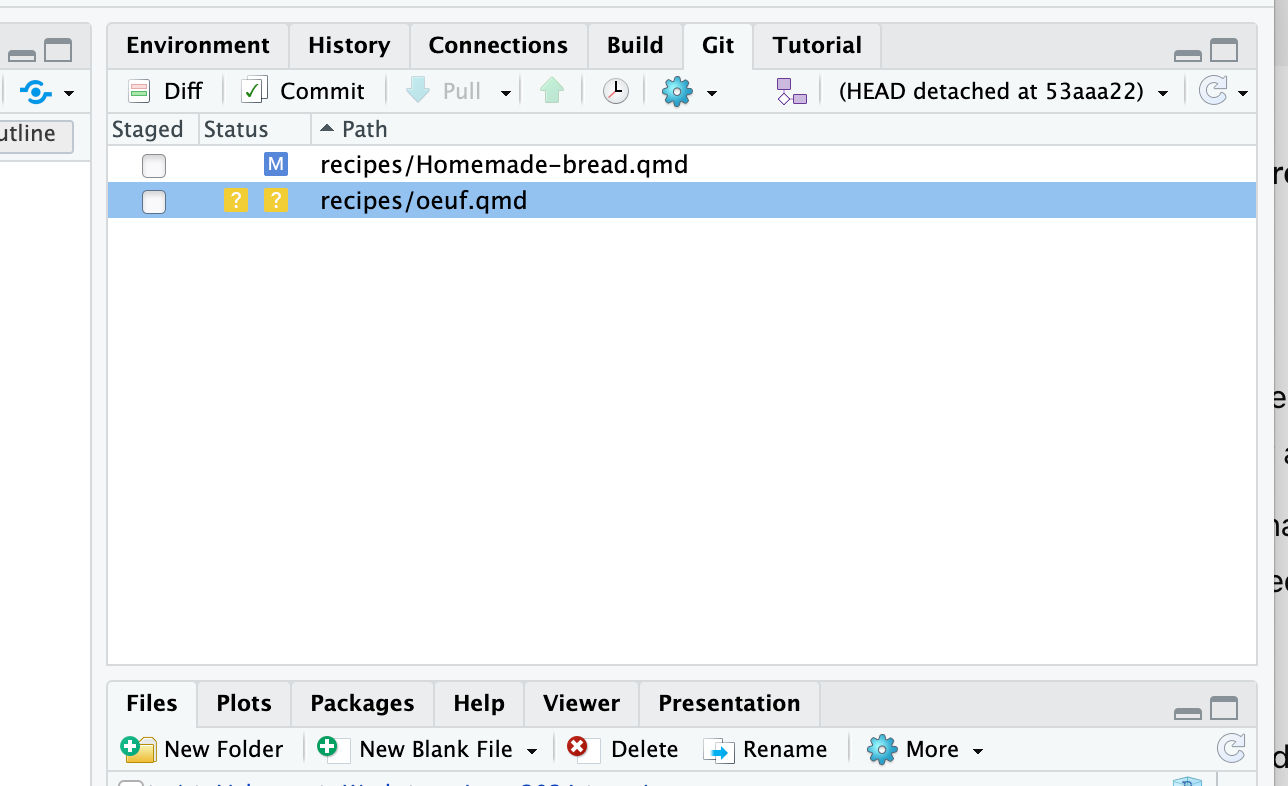
Git tab in Rstudio
Playtime
- Do a
git log | head -n 20in cli (in therecipes-2024dir) - Now press
pullin Rstudio - Do a
git log | head -n 20in cli (in therecipes-2024dir) - Press “history” in Rstudio
- Edit some file and save it
- Run
git status - Now stage the file in Rstudio
- Run
git status - Now commit the file in RStudio. DON’T PUSH
- Finally, we want to undo the last commit (first with
git revert, then by resetting`
git reset
git reset changes the commit that the current branch points to.
git reset 00ac05means “make the current branch point to00ac05- (
git reset --hard 00ac05does the same, but also checks out the new code) git reset branch1means “make the current branch point to whateverbranch1points to nowgit reset HEAD~1means “make the current branch point to the parent ofHEAD”git reset HEAD~2means “… to the parent of the parent ofHEAD”, etc.git reset origin/mainmeans “make the current branch point to whatever was themainbranch onorigin, last time we fetched (or: remove all local commits)
Warning
This is one of those “with great power….” commands. Where normally git only allows you to add new info (never permanently delete something that was committed before), git reset does have the power to make existing commits orphans (and schedule them for deletion).
At least as long as you don’t do git push -f, everything on GitHub will be safe.
Playing with git / more commands
We only brushed the surface of git commands. There are commands to
- restore a file that was deleted, or from another branch (
git restore) - unstage a file (
git restore --staged) - to update the latest commit (
git commit --amend) – only do this if not pushed yet - to do a binary search in a list of commits (
git bisect) - to import other git repositories into your own (
git submodule add) - to quickly store your local changes to use later (
git stash) - etc
Note
When you git clone a repo, by default the submodules are not cloned. Sometimes you see instructions to run git submodule update --init --recursive after a clone – this is to install all submodules as well.
Google/ChatGPT is your friend, however, be safe:
- Whatever is on GitHub is safe (as long as you don’t do
push -f) gitis just a directory in your working directory. If you want to try something scary, just make a copy of the whole directorycp -r myrepo myrepo2and experiment. If it works, you can even directly push frommyrepo2and pull again inmyrepo.- Likewise, you can just make backups of your full repo (or zip it and mail it to yourself or whatever you like)
- If you really mess up (e.g. you do a
git resetand lose some important commits), don’t panic.gitwill only remove orphans after a while, if you rungitin that directory. So, first thing to do, make a backup (zip the whole directory). Once you have this, you can always send this zipfile to a smart person and they can probably recover your work. - Then again, most git commands (if you don’t use
--forceor--hard) should not remove any code.
Playtime
Homework for the coming weeks (we will discuss progress next week):
- Make a PR to another repo (ideally a meaningful change on a repo of someone you don’t know)
- If nothing else, try to correct someone’s spelling
- However if you’re more engaged, try to find some realy bug, possibly from their “good-first-issue” list.